


 NextDoor Housing
The dynamic development of the labor market and the evolution of higher education have meant that the modern student room no longer serves only as a bedroom and a place to rest. For many young, ambitious people, it becomes a regular office. Combining full-time studies with a full-time job, freelancing, or developing your own startup remotely is now the standard.
However, living and working in the same space carries a huge risk. Without proper preparation, it is easy to fall into the trap of permanent fatigue, procrastination, and blurring the boundary between private and professional life (the so-called work-life blur). When you work from your bed, your brain stops associating it with rest, which leads straight to insomnia problems. On the other hand, a lack of ergonomic work setup quickly results in back pain and reduced concentration.
The key to success is creating a highly effective home office micro-space within your dorm room. Proper layout, ergonomic management, lighting, and digital optimization will allow you to reach the level of deep work (deep work) and maximum productivity without losing psychological comfort.
1. Workstation ergonomics, or the foundation of healthy productivity
Remote work can lull you into a false sense of security. The temptation to open your laptop right under the duvet is enormous, but from the perspective of human biomechanics, it is the worst possible scenario. Spending several hours a day in a forced, unnatural position drastically reduces oxygen supply to the brain, generates tension headaches, and damages the cervical and lumbar spine.
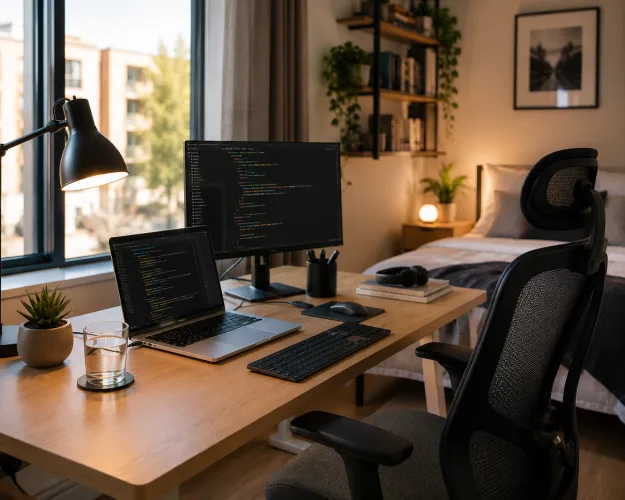
New-generation private dormitories are equipped with sturdy, large desks and ergonomic chairs, which provides an excellent starting point. Your task is to properly calibrate this space:
- Right-angle rule: Adjust the chair height so that your feet rest flat on the floor and your knees are bent at a 90-degree angle. Your forearms should rest comfortably on the desk, also forming a right angle at the elbows. This relieves the shoulder girdle muscles.
- Eye line at screen height: The top edge of your laptop or external monitor should be exactly at eye level (or slightly below), about 50–70 cm from your face. If you work exclusively on a laptop, invest in a stable laptop stand and an external keyboard and mouse. Raising the screen will prevent the habitual forward tilt of the head (the so-called text neck syndrome).
2. Light architecture: How to trick your biological clock
Light is one of the strongest stimulators of the human nervous system. Proper management of lighting at your workstation determines whether your brain enters a state of high focus or starts producing melatonin, causing drowsiness in the middle of the workday.
- Make the most of daylight: Place your desk as close to the window as possible. The best solution is a side-on arrangement – this way, sunlight does not reflect directly off the computer screen and does not shine into your eyes. Natural light stimulates the production of dopamine and cortisol, naturally increasing your energy levels.
- Task lighting (color temperature): Your desk lamp should be equipped with a bulb with a cool or neutral light color (in the range of 4000K–5500K). Cool light mimics the middle of a sunny day, sending a clear signal to the brain: “Time to act and concentrate.”
- Switching modes in the evening: When you finish work and transition into relaxation mode, be sure to turn off strong desk lighting. Turn on small lamps with warm light (below 3000K) or LED strips hidden behind furniture. This visual change in the room’s atmosphere will allow your nervous system to safely switch into a calm state.
3. Psychological zoning of the space (The Anchoring Method)
Living in a single room or studio means you have to do the impossible: fit a bedroom, dining room, living room, and office into just a few square meters. To keep your sanity, you need to apply so-called behavioral zoning. This means assigning specific behaviors to specific points in the room.
- The desk is a zone for work only: Your desk must not have lunch plates, dirty mugs, or scattered clothes on it. When you sit down at your desk, open your laptop, and switch on the lamp, your mind must know that there is no room for distractions here. Do not browse social media at your desk – if you want to take a phone break, stand up, sit on your bed, or go to the common area.
- The bed is a work-free zone: Never, under any circumstances, open your work laptop on the bed. The bed must remain a psychological sanctuary of pure rest and sleep. Breaking this rule is the easiest path to chronic insomnia, because your brain will start associating your sleeping place with work stress and analyzing emails from clients.
4. Acoustic protective armor in the dormitory
Even the best-arranged home office will not fulfill its purpose if roommates are talking loudly behind the wall and student life is buzzing in the hallway. Focusing on a difficult task, writing code, analyzing data, or taking an important call with a client requires cutting yourself off from auditory stimuli.
- Active noise-canceling headphones (ANC): This is absolutely the best investment you can make as a student working remotely. Good ANC headphones can almost completely eliminate monotonous ambient sounds – refrigerator hum, street noise, or muffled conversations outside the window.
- White noise and soundscapes: If silence distracts you, instead of popular music (which engages the language areas of the brain and makes writing or calculating harder), turn on background sounds. Rain sounds, café ambience (bruit de café), or so-called white or brown noise work perfectly. They help put the brain into a state of flow (flow), isolating you from your surroundings.
5. Use the dormitory infrastructure (Coworking and Quiet Zones)
The biggest advantage of living in a modern premium dormitory is that your home office does not end at your room door. If you feel that the walls of your studio are starting to overwhelm you (the so-called cabin fever), you have access to the building’s powerful logistical infrastructure.
- Coworking zones: These are dedicated spaces inside the dormitory, designed exactly like modern offices in tech corporations. You will find large tables, comfortable office chairs, whiteboards, and fast internet. Working alongside other focused people activates the phenomenon of social facilitation – you subconsciously work more efficiently when you see that others around you are also productive.
- Quiet zones: Ideal places for moments when you need to prepare for a difficult exam or write a complex legal or financial report. There is a complete ban on conversation, which guarantees conditions similar to a university reading room.
6. Digital hygiene and time management in a remote model
Working in a dormitory can make you lazy because there is no direct supervision from a boss or manager. The line between a break and procrastination is often extremely thin. You need to implement strict time boundaries.
- Set fixed working hours: Work within a designated block (e.g., 9:00 a.m. – 2:00 p.m.). After that time ends, close your laptop, put it in a drawer or bag, and officially announce the end of the workday. Without physically closing the computer, you end up working “all the time and never” – replying to emails at 10:00 p.m. wastes time that should be used for real recovery.
- Transition ritual (Commute): In traditional work, the return home by tram or car allows for decompression and mental separation from duties. When working remotely from your room, you need to simulate this ritual. After finishing work, get up from your desk, go for a 15-minute walk around the dormitory, or take a stroll to a nearby park. When you return, your room will once again be only a private space, not an office.
Summary
Arranging an effective home office in a student room is not a matter of having a huge amount of space, but of consciously managing ergonomics, light, and your own habits. By taking care of the correct body position, clearly separating your work zone from your sleep zone, and making smart use of coworking spaces in the dormitory, you gain a powerful tool for building your professional career already during your studies. A well-organized workstation means higher efficiency, better earnings, higher grades, and above all – a healthy spine and peace of mind after hours.